
How to Watch Live Sports Without Cable in the USA (2026 Guide)
Yes, you can watch live sports without cable in the USA. With the evolution of digital television and internet broadcasting, sports fans no longer need traditional cable or satellite contracts to follow their favorite teams. Today, several legitimate alternatives exist—ranging from free over-the-air broadcast antennas to live TV streaming services, direct-to-consumer sports apps, out-of-market league passes, and IPTV options. The optimal setup depends on which sports and teams you follow, your location, your budget, and whether you watch local in-market broadcasts or out-of-market games.
Key Takeaways
- 5 Main Viewing Options: Sports fans can choose between Over-the-Air (OTA) antennas, Live TV Streaming Services (vMVPDs), Direct-to-Consumer (DTC) apps, out-of-market League Passes, and IPTV networks.
- Free Local Broadcasts: OTA digital antennas deliver high-definition local broadcasts for ABC, CBS, FOX, and NBC games with low latency and no monthly subscription fees.
- Understanding Sports Blackouts: Regional blackouts are governed by territorial broadcasting contracts; utilizing local OTA broadcasts, authorized RSN applications, or official league streaming passes helps fans access available games in their region.
- High Frame-Rate Viewing: Live sports benefit from 60 FPS streams and a stable broadband connection (often 25+ Mbps for HD) to reduce motion blur and maintain playback stability.
- Flexible Budget Options: Sports lovers can reduce monthly entertainment expenses by selecting targeted streaming combinations rather than maintaining legacy cable packages.
01. The State of Sports Cord-Cutting in 2026
The sports broadcasting landscape in the United States has shifted significantly over recent years. As cable television prices rise and broadcast agreements fragment across traditional channels and streaming platforms, millions of American households have opted for cable alternatives. Live sports, once considered the primary reason to maintain a cable package, are now accessible across multiple digital platforms.
Three main factors continue to drive cord cutting among sports fans:
- Rising Cable & Surcharge Costs: Traditional cable packages often include additional fees, such as regional sports network surcharges and set-top equipment rentals, driving up overall monthly bills.
- Broadcast Rights Fragmentation: League broadcasts are distributed across broadcast networks (CBS, FOX, NBC, ABC), cable channels (ESPN, FS1, TNT), and standalone streaming services (Amazon Prime Video, Peacock, Paramount+, Apple TV+).
- Expanded Broadband Availability: Widespread high-speed fiber and 5G internet access make high-definition and 4K live sports streaming smooth and accessible across standard consumer devices.
Many sports fans who transition from traditional cable packages can significantly lower their monthly costs by combining an OTA antenna for local broadcast channels with select streaming apps for national and out-of-market games.
02. The 5 Core Ways to Watch Live Sports Without Cable
Viewers looking for cable alternatives have five primary options to stream live sports without cable in the USA. Each approach offers distinct features, pricing, and content availability.
1. Over-the-Air (OTA) Antennas (ATSC 3.0 / NextGen TV)
An indoor or outdoor digital antenna receives high-definition broadcast signals directly from local affiliate stations (ABC, CBS, FOX, NBC, CW). ATSC 3.0 (NextGen TV) signals can also support enhanced resolution and audio depth where available.
- Pros: Completely free after purchasing the antenna; offers low-latency viewing directly from local broadcast towers; delivers uncompressed picture quality.
- Cons: Restricted to local network affiliate broadcasts (e.g., Sunday NFL games, broadcast playoffs, major college football); does not carry cable-only channels like ESPN, FS1, or TNT.
- Best for: Casual fans and viewers who primarily watch home-market broadcast games and major network events.
2. Virtual Multichannel Video Programming Distributors (vMVPDs)
vMVPD services—including YouTube TV, Fubo, Hulu + Live TV, Sling TV, and DirecTV Stream—deliver live channel bundles over an internet connection. They provide live sports channels, cloud DVR storage, and multi-device support. To analyze how internet television compares against mainstream live TV bundles, consult our in-depth comparison of IPTV vs. YouTube TV.
- Pros: Complete channel coverage (ESPN, FS1, FS2, TNT, TBS, Golf Channel, NFL Network); familiar cable-like guide; cloud DVR functionality.
- Cons: Higher monthly cost ($40–$95/month depending on plan and add-ons); subject to contractual channel carriage changes between distributors and media networks.
- Best for: Fans seeking a direct, all-in-one cable replacement with extensive live sports channel lineups.
3. Direct-to-Consumer (DTC) Standalone Streaming Apps
Many media networks now offer standalone streaming applications that feature live sports alongside on-demand content. Key DTC sports providers include Peacock (NFL, Premier League, Big Ten), Paramount+ (NFL on CBS, UEFA Champions League), ESPN+ (NHL, UFC Fight Nights, FA Cup), Prime Video (Thursday Night Football, NWSL), Apple TV+ (MLS Season Pass, Friday Night Baseball), and Max with B/R Sports (NBA, NHL, MLB, NCAA March Madness).
- Pros: Cost-effective per service; exclusive live events and multi-camera feeds; on-demand replays and sports documentaries.
- Cons: Requires managing multiple standalone subscriptions to cover different sports leagues.
- Best for: Targeted sports fans who follow specific leagues (e.g., Premier League on Peacock, MLS on Apple TV+, or UFC on ESPN+).
4. Single-League & Out-of-Market Passes
For sports fans living outside their favorite team’s home broadcast market (such as a Dallas Cowboys fan living in New York), official single-league passes—such as NFL Sunday Ticket, NBA League Pass, MLB.tv, and NHL.tv—provide access to out-of-market regular season games.
- Pros: Guarantees access to out-of-market regular season games; includes home and away commentary feeds, statistics, and full-game replays.
- Cons: Subject to regional in-market blackouts for local teams; seasonal or annual subscription fees.
- Best for: Out-of-market sports fans following non-local teams.
5. IPTV Architecture & Technological Framework
IPTV (Internet Protocol Television) refers to the technical delivery of television content over Internet Protocol (IP) networks using streaming protocols like HLS (HTTP Live Streaming) and Xtream Codes APIs. For a foundational overview of this technology, read our beginner’s guide to IPTV. Content availability and channel selection depend on the specific provider’s licensing and distribution rights. Viewers use media player applications (such as TiviMate, IPTV Smarters Pro, or GSE Smart IPTV) on compatible streaming devices to manage channel feeds and Electronic Program Guides (EPG)—see our guide to the best IPTV player applications for setup options. Fans evaluating service options in the USA should ensure providers comply with official broadcasting rights and licensing regulations; for more background, explore whether IPTV is legal in the USA.
- Pros: Flexible multi-device playback; supports EPG integration; customizable player interfaces and multi-screen viewing.
- Cons: Requires initial technical configuration; stream quality and stability vary by infrastructure and licensing; requires verifying service compliance.
- Best for: Tech-savvy users looking for customizable IP-based TV management across compatible streaming hardware.

IPTV pricing varies significantly by provider, package, licensing, included content, and billing period.
| Method | Est. Monthly Cost | Key Channels Included | Regional Availability | Resolution / Frame Rate |
|---|---|---|---|---|
| OTA HD Antenna | $0 / month | ABC, CBS, FOX, NBC, CW | Local Broadcasts Only | 1080i / 1080p @ 60fps / 4K |
| vMVPD Services | $40 – $95 / mo | ESPN, FS1, TNT, TBS, RSNs | Varies by Market | 720p / 1080p @ 60fps |
| DTC App Stack | $6 – $15 / service | Peacock, Paramount+, ESPN+ | Platform Rights | 1080p @ 60fps / 4K HDR |
| League Passes | $15 – $35 / mo | NFL, NBA, MLB Out-of-Market | Out-of-Market Focus | 1080p @ 60fps |
| IPTV Options | Varies by provider | Varies by Provider Licensing | Provider Dependent | 1080p @ 60fps / 4K UHD |
03. Anatomy of Sports Blackouts: Causes & Official Solutions
Regional sports blackouts occur when a live game is unavailable on a specific platform within a local geographical market. These restrictions are governed by commercial broadcasting rights agreements negotiated between sports leagues, television networks, and Regional Sports Networks (RSNs).
Why Sports Blackouts Exist
Blackout restrictions are driven by exclusive regional broadcasting contracts. When a Regional Sports Network (RSN) pays for exclusive rights to transmit a team’s games within a designated home market (such as the Boston Red Sox on NESN or the New York Knicks on MSG Network), national streaming platforms and league passes are legally restricted from streaming those games to IP addresses located within that team’s designated market territory.
Legitimate Ways to Watch Local & Regional Games
- Check Local Broadcast Availability: Local network games (such as Sunday NFL broadcasts on CBS/FOX or broadcast playoffs on ABC) are typically available via a digital OTA antenna within the home broadcast market.
- Subscribe to Authorized RSN Direct Services: Many regional sports networks now offer authorized direct-to-consumer streaming passes—such as NESN 360, FanDuel Sports Network App, or YES App—allowing local fans to stream home games legally without a traditional cable bundle.
- Use Official Network & League Applications: Viewers can verify broadcast schedules on official network and league platforms to confirm which authorized local channel or regional application carries the match in their location.
04. Complete League-by-League Streaming Blueprint
Navigating sports streaming requires knowing which platform carries licenses for each league. Below is an overview of major North American sports broadcasting channels and streaming options:
Note: Sports broadcasting rights change regularly, so availability, pricing, and blackout restrictions can vary by season, location, and service. Availability varies by season, market, and current broadcasting rights. Check the official provider before subscribing.
| League / Sport | Primary Channels & Services | Direct Streaming Apps | Out-of-Market / Regional Notes |
|---|---|---|---|
| NFL Football (watch NFL without cable) |
CBS, FOX, NBC, ESPN, NFL Network | Peacock, Paramount+, Prime Video, ESPN+ | NFL Sunday Ticket for out-of-market games |
| NBA Basketball (watch NBA without cable) |
ABC, ESPN, TNT Sports, NBA TV | Max (B/R Sports), ESPN App | NBA League Pass; RSN apps for local teams |
| MLB Baseball (watch MLB without cable) |
FOX, FS1, TBS, ESPN | Apple TV+, Peacock, Max | MLB.tv; local RSN apps for in-market games |
| NHL Hockey (watch NHL without cable) |
ESPN, TNT, ABC, NHL Network | ESPN+, Max (B/R Sports) | ESPN+ for out-of-market games; RSN apps for local teams |
| MLS & Soccer | FOX, FS1, Telemundo | Apple TV+ (MLS Season Pass), Peacock | MLS Season Pass covers all matches globally |
| Premier League | NBC, USA Network | Peacock Premium | Peacock carries exclusive live matches & replays |
| UFC & Combat Sports (watch UFC without cable) |
ESPN, ABC (Fight Nights) | ESPN+ (PPV Events), DAZN | Official PPV events available through ESPN+ and authorized platforms |
05. Hardware, Bandwidth & 60 FPS Optimization
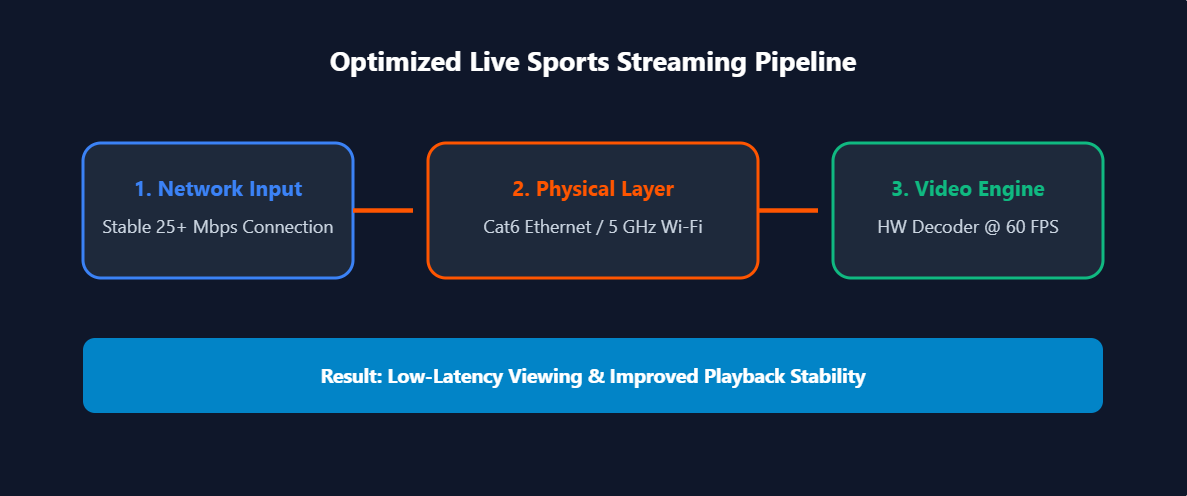
Delivering clear, fluid live sports playback requires adequate internet bandwidth and appropriate hardware decoder settings. For step-by-step app setup instructions on Firestick, Apple TV, and Smart TVs, refer to our IPTV installation guide.
The Importance of High Frame Rates (60 FPS)
Because live athletic events involve rapid motion, streaming at 60 frames per second (60fps) helps reduce motion blur during fast plays. Setting your media player app’s video decoder to Hardware (HW) decoding can improve playback stability and reduce CPU strain on streaming hardware.
Recommended Live Sports Hardware & Network Setup
- Connection Bandwidth: A stable connection of around 25 Mbps or more is generally a reasonable starting point for a single HD stream, while 4K streaming can require substantially more bandwidth depending on the service.
- Wired Ethernet Connection: Connecting your streaming device via a Cat6 Ethernet cable can reduce Wi-Fi signal fluctuations and improve stream consistency.
- Wi-Fi Tuning: When connecting via Wi-Fi, using the 5 GHz band helps minimize interference from other household devices.
- Compatible Hardware: Popular streaming devices include Apple TV 4K, Fire TV Stick 4K Max, NVIDIA Shield TV Pro, and Google TV Streamer.
- Video Engine Settings: Using Hardware (HW) decoding mode in media player apps can help maintain smooth 60fps video rendering.
06. Cord-Cutting Budget Tiers & Recommended Stacks
Rather than paying for a bloated cable bundle, sports fans can select a tailored stack aligned with their budget and viewing preferences. If IPTV is one of the options you’re considering, compare providers based on pricing, supported devices, channel availability, reliability, and licensing.
Tier 1: Ultra-Budget ($0 – $15 / month)
Best for casual fans who primarily follow local broadcast games and major events.
- Setup: OTA HD Digital Antenna ($30 one-time fee) + select streaming app (e.g. Peacock Premium at $6/mo).
- Coverage: NFL Sunday afternoon games (CBS/FOX), Sunday Night Football (NBC), Super Bowl rotation, Notre Dame football, Big Ten basketball, Premier League soccer, and major golf majors.
Tier 2: Mid-Tier Sports Fan ($35 – $55 / month)
Best for dedicated fans who follow college sports, soccer, and national league games.
- Setup: OTA Antenna + Sling TV Blue ($40/mo) or targeted DTC apps (ESPN+, Paramount+, Peacock).
- Coverage: Broadcast channels via antenna, FS1, NFL Network, Premier League, UEFA Champions League, NHL out-of-market games, UFC Fight Nights, and FA Cup.
Tier 3: Full Cable Replacement ($70 – $95 / month)
Best for die-hard sports fans who require instant access to every cable sports network and regional channel.
- Setup: YouTube TV, Fubo, or DirecTV Stream base plan + authorized RSN direct app.
- Coverage: Full access to ESPN, ESPN2, ESPNU, FS1, FS2, TNT, TBS, SEC Network, ACC Network, Big Ten Network, RSNs, and full cloud DVR functionality.
07. Troubleshooting Stream Buffer & Connection Issues
Experiencing stream buffering during a key play can happen on any internet-based platform. For a detailed guide on optimizing playback settings, read our tutorial on how to stop IPTV buffering. Follow these practical steps to reduce the likelihood of buffering:
- Check for Network Congestion: Test your internet connection speed. If buffering occurs, reduce competing household network traffic, move your wireless device closer to the router, or restart your modem and router. Contact your ISP if connection speeds fall significantly below your plan’s rating.
- Adjust Media Player Decoding: In media applications (like TiviMate or custom player software), switch between Hardware (HW) and Software (SW) decoding to find the setting that performs best on your streaming device.
- Clear Application Cache: Accumulating temporary cache files can slow down app performance. Clear your streaming app cache under device settings (
Settings > Applications > App > Clear Cache). - Increase Buffer Memory: Adjust your media player app’s buffer size setting from low to medium/high to help absorb minor network speed fluctuations.
08. Frequently Asked Questions (FAQ)
How can I watch live sports without cable in the USA?
You can watch live sports without cable by using an over-the-air (OTA) digital antenna for free local network broadcasts (ABC, CBS, FOX, NBC), subscribing to live TV streaming services (vMVPDs like YouTube TV or Sling TV), using standalone streaming apps (Peacock, Paramount+, ESPN+), or exploring licensed IPTV services.
What is the cheapest way to watch live sports without cable?
The most affordable approach is combining a digital antenna for free local broadcast games ($0 ongoing cost) with targeted streaming apps like Peacock ($6/mo) or ESPN+ ($11/mo), keeping total monthly expenses under $20.
Can I watch pay-per-view events without cable?
Yes. Major PPV events (such as UFC Pay-Per-View fight cards) can be purchased digitally through authorized platforms like ESPN+ without requiring a traditional cable subscription.
How can I reduce live sports stream buffering?
To help reduce buffering during live sports streams: 1) Connect your streaming hardware via Ethernet cable; 2) Ensure your internet speed meets your provider’s recommended threshold; 3) Set app decoding to Hardware (HW) mode; and 4) Clear app cache periodically.
Do sports blackouts apply to live streaming services?
Yes. Sports blackouts can apply to streaming services because of regional broadcasting rights. Availability varies by league, service, and location. Viewers should check the official broadcaster or league service for the games available in their area.